What Is Wi-Fi Penetration Testing? A Business Guide to Wireless Security Assessment

- Published:
- Last Updated:
Wi-Fi Penetration Testing is an authorized wireless security assessment that checks business Wi-Fi networks for weak encryption, rogue access points, insecure authentication, guest network exposure, and segmentation gaps. This guide explains why it matters, how the process works, what reports include, and when organizations should conduct wireless testing.
What is Wi-Fi penetration testing?
Wi-Fi penetration testing is a controlled security assessment used to identify and validate risks in wireless networks. It helps organizations understand whether weak configurations, poor access controls, rogue devices, or guest network issues could expose business systems or sensitive information.
A professional Wi-Fi penetration test is always performed with permission. The goal is not to disrupt business operations but to find weaknesses before they are misused.
Why Does Business Need WiFi Penetration Testing?
Businesses need Wi-Fi penetration testing because wireless networks can expose internal systems if they are not properly configured, monitored, and segmented. Testing helps identify risks early and supports better security, compliance, audit readiness, and access control management.
Wi-Fi penetration testing helps businesses:
- Identify unauthorized or suspicious wireless access points
- Check whether guest users are separated from internal systems
- Validate encryption and authentication controls
- Find risky configurations before audits or incidents
- Support evidence-based security improvement
- Improve employee and vendor access practices
For smaller teams, wireless security is especially important because one misconfigured network can affect several systems.
What Are the Benefits of Wireless Penetration Testing?
Wireless penetration testing helps businesses reduce wireless security risks, improve visibility, strengthen access controls, and create practical remediation plans. It also supports security governance by giving leaders clear evidence of risks, impact, and corrective actions.
| Benefit | What It Means | Business Value |
|---|---|---|
| Better visibility | Identifies approved and unknown wireless networks | Reduces hidden exposure |
| Stronger access control | Checks who can connect and how | Limits unauthorized access |
| Guest network safety | Reviews separation from internal systems | Reduces lateral movement risk |
| Audit support | Provides documented findings and actions | Improves compliance evidence |
| Risk prioritization | Ranks issues by severity | Helps teams fix critical gaps first |
| Security awareness | Shows risky user or device behavior | Supports training and culture |
Who needs Wi-Fi penetration testing?
Any organization that uses business Wi-Fi, guest networks, shared office access, vendor connectivity, or wireless-enabled devices can benefit from Wi-Fi penetration testing.
Wi-Fi penetration testing is useful for:
- Offices with employee and guest Wi-Fi
- Healthcare, finance, education, and technology organizations
- Businesses using IoT or smart office devices
- Companies preparing for audits or client security reviews
- Organizations with hybrid work and frequent visitor access
- Teams that recently changed routers, access points, or network policies
Read more: How Ethical Hackers Protect Systems
What Are the Steps in a Wireless Penetration Test?
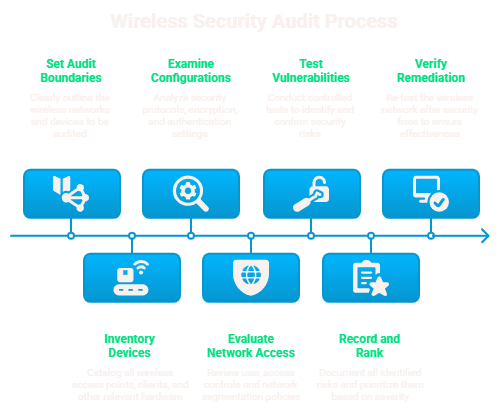
A wireless penetration test usually includes scoping, asset discovery, configuration review, controlled testing, risk analysis, reporting, remediation, and retesting. Each step should be authorized, documented, and aligned with business risk.
Here is how a professional wireless penetration test is usually carried out in a simple, business-friendly way:
Define the Scope:
Decide which office locations, Wi-Fi networks, guest networks, access points, and testing windows are included. This keeps the test controlled and avoids unnecessary disruption.
Identify Wireless Assets:
Review approved SSIDs, access points, connected devices, signal coverage, and any unknown wireless networks. This helps detect unauthorized or unmanaged wireless exposure.
Review Security Settings:
Check encryption, authentication, password rules, firmware, router settings, admin access, and guest network controls. Weak settings can make the network easier to misuse.
Assess Access and Segmentation:
Verify whether employees, guests, vendors, and devices have the right level of access. Guest users should not be able to reach internal business systems.
Validate Risks Safely:
Test selected risks in a controlled way to understand real business impact without harming systems or interrupting operations.
Document and Prioritize Findings:
Record each issue with severity, evidence, business impact, recommended action, responsible owner, and target closure date.
Retest After Fixes:
After remediation, retesting confirms whether the issue has been fixed properly and whether the wireless risk has been reduced.
What Tools Are Used for Wireless Pen Testing?
Wireless pen testing tools help professionals discover networks, review configurations, capture evidence, monitor traffic patterns, and document findings.
These can include:
- Wireless network discovery tools
- Configuration review tools
- Packet analysis tools
- Vulnerability assessment platforms
- Network mapping tools
- Log monitoring and alerting tools
- Reporting and evidence management tools
Read also: What are Tools Used by Ethical Hackers
How Can Businesses Secure Wireless Networks?
Businesses can secure wireless networks by using strong encryption, unique access credentials, segmented guest networks, updated firmware, monitored access logs, and regular wireless security reviews.
Important practices include:
- Use strong encryption and secure authentication
- Avoid shared Wi-Fi passwords where possible
- Separate guest Wi-Fi from internal systems
- Disable unused networks and default settings
- Keep routers and access points updated
- Review vendor and visitor access regularly
- Monitor suspicious wireless activity
- Train employees not to connect unknown devices
What's the Difference Between Wi-Fi vulnerability scan vs Wi-Fi penetration test?
A Wi-Fi vulnerability scan identifies possible wireless weaknesses, while a Wi-Fi penetration test checks how serious those weaknesses are through controlled and authorized testing.
| Factor | Wi-Fi Vulnerability Scan | Wi-Fi Penetration Test |
|---|---|---|
| Purpose | Finds possible wireless weaknesses | Validates how serious the weaknesses are |
| Depth | Basic to moderate review | Deeper security assessment |
| Best Used For | Routine checks and regular monitoring | Audits, major changes, or high-risk reviews |
| Output | List of possible issues | Confirmed risks with impact and evidence |
| Business Value | Helps detect common gaps early | Helps prioritize critical fixes |
| Testing Style | Mostly review-based | Controlled and authorized validation |
| Evidence Level | Limited evidence | Stronger evidence for security and audit teams |
When Should You Conduct a Wireless Penetration Test?
Wireless penetration testing should be done before major network changes, after new office setups, before audits, after incidents, and whenever guest, vendor, or employee access changes.
Businesses should conduct wireless penetration testing:
- Before opening a new office
- After changing routers or access points
- After introducing guest or vendor Wi-Fi
- Before a compliance audit or client security review
- After a suspected wireless security incident
- After major changes in employee access
- Periodically as part of risk management
Conclusion
Wi-Fi Penetration Testing helps organizations understand whether their wireless networks are truly secure or only appear secure on paper. By testing access controls, segmentation, encryption, rogue devices, and configuration gaps, businesses can reduce risk before attackers exploit wireless access.
Explore SecuRetain's learning platform and our all courses to build practical knowledge in cybersecurity, compliance, risk management, audit, business continuity, disaster recovery, fraud management, and employee awareness training.
You can also visit our website to explore how SecuRetain helps professionals and organizations strengthen skills, improve awareness, and support continuous learning in a structured and scalable way.
FAQs
Wi-Fi penetration testing is an authorized assessment that checks wireless networks for security weaknesses such as weak encryption, rogue access points, insecure authentication, and guest network exposure.
Yes, Wi-Fi penetration testing is legal when it is done with written permission, a defined scope, and proper documentation from the network owner.
Businesses should perform wireless penetration testing periodically and after major changes such as new offices, access point upgrades, vendor access updates, or suspected incidents.
Wi-Fi scanning identifies possible weaknesses, while penetration testing validates risk more deeply through controlled and authorized security testing.
Yes, Wi-Fi penetration testing can support audits by providing evidence of wireless risk review, access control testing, remediation actions, and retest results.
Build practical wireless security skills
Explore cybersecurity courses that help learners understand penetration testing, vulnerability assessment, access control, reporting, and business risk reduction.
Related reads
Keep exploring
 Cybersecurity
A step-by-step guide to conducting vulnerability assessments safely, from scope and asset discovery to scanning, prioritization, remediation, and reassessment.
 Ethical Hacking
Basic penetration testing is an authorized security assessment that helps identify, validate, and report security weaknesses before attackers can misuse them.
 DPDP
DPDPUnderstand India's Personal Data Protection Act, including its scope, key terms, business duties, individual rights, enforcement, penalties, and practical DPDP compliance steps.