What Are Social Engineering Attacks? Meaning, Types, and Prevention

Summarise on:

Author

Charu Pel

Charu Pel

8 min Read

Published
Modified

Social Engineering Attacks are cyberattacks that manipulate people into sharing sensitive information, clicking harmful links, or taking unsafe actions. This guide explains the meaning, common types, warning signs, real examples, and prevention steps so readers can understand how these attacks work and how to stay protected.

What Is the Definition of Social Engineering?

Social Engineering Attacks are security threats where attackers exploit human trust, fear, urgency, or curiosity instead of directly breaking into systems. The goal is to trick people into giving access, data, money, or confidential information. In simple terms, the social engineering attack definition is: a manipulation-based cyberattack that targets human behavior rather than only technical vulnerabilities. Social engineering is dangerous because even strong security tools can fail when a trusted person is convinced to take the wrong action.

How Do Social Engineering Attacks Work?

Social Engineering Attacks work by studying a target, creating a believable story, building trust, and pushing the victim to act quickly without verifying the request.

Attackers usually follow a simple pattern:

  • They collect information from public sources such as LinkedIn, websites, social media, and company pages.
  • They choose a target based on access, role, influence, or financial authority.
  • They create a fake reason for contact, such as account verification, invoice approval, or urgent support.
  • They use emotional triggers like fear, pressure, curiosity, or greed.
  • They ask the victim to click a link, download a file, share credentials, or transfer money.
  • They use the stolen information to access systems, commit fraud, or continue deeper attacks.

What Makes These Attacks Successful?

Attackers succeed because they make the request look normal, urgent, or trusted.

  • The message may look like it came from a known company.
  • The sender may copy a real employee's name or email style.
  • The link may look similar to a genuine login page.
  • The request may appear time-sensitive.
  • The victim may not get enough time to think or verify.

The safest response to suspicious requests is to slow down, verify independently, and avoid acting under pressure.

Read also: How to Perform Basic Pentesting Step by Step

How to Identify Social Engineering Attacks?

One can identify Social Engineering Attacks by looking for unusual requests, emotional pressure, mismatched details, and actions that bypass normal processes.

Common warning signs include:

  • Messages asking for passwords, OTPs, banking details, or confidential files.
  • Requests that create urgency, such as "act now," "final warning," or "account will be blocked."
  • Email addresses, links, or domains that look slightly different from the real ones.
  • Unexpected attachments, login pages, QR codes, or payment instructions.
  • Requests from senior executives that avoid official approval channels.
  • Messages with poor grammar, unusual tone, or strange formatting.
  • Offers that look too good to be true, such as rewards, refunds, or job opportunities.

What Should You Check Before Responding?

Before responding, verify the request through a trusted channel.

  • Check the sender's email domain carefully.
  • Hover over links before clicking.
  • Contact the person directly using a known phone number or official email.
  • Report suspicious messages to the security or IT team.
  • Avoid sharing sensitive data through chat or email without approval.

Most attacks depend on speed. Verification breaks the attacker's momentum.

Read more: What Is Enumeration in Ethical Hacking?

What Are the Different Types of Social Engineering Attacks?

The different types of social engineering attacks include phishing, vishing, smishing, baiting, pretexting, business email compromise, and impersonation.

TypeMeaningCommon Risk
PhishingFake emails that trick users into clicking links or sharing dataCredential theft
SmishingFraudulent SMS or messaging-based attacksOTP or payment fraud
VishingVoice calls pretending to be trusted people or organizationsFinancial or identity fraud
PretextingFake story used to gain trustData leakage
BaitingFake offer, file, or device used as a trapMalware infection
Business Email CompromiseFake executive or vendor email requestPayment fraud

Read also: Ethical Hacking Techniques: A Complete Beginner-Friendly Guide

What Are Common Social Engineering Attack Techniques?

Common attack techniques use pressure, trust, impersonation, and deception to influence user behavior.

Attackers may use:

  • Authority: Pretending to be a manager, IT admin, auditor, bank officer, or government representative.
  • Urgency: Creating panic by saying the account, payment, or access will be blocked.
  • Fear: Warning users about fake security incidents or legal issues.
  • Curiosity: Sending unknown attachments, links, or "confidential" documents.
  • Reward: Offering prizes, refunds, discounts, jobs, or free access.
  • Trust-building: Starting with harmless conversations before asking for sensitive data.

What Are Examples of Social Engineering Attacks?

Indications like fake login emails, fraudulent payment requests, fake IT support calls, and messages that trick users into sharing OTPs or passwords.

Common examples include:

  • An employee receives a fake Microsoft 365 login email and enters credentials on a fake page.
  • A finance team member gets a fake vendor invoice with changed bank details.
  • A user receives a call from someone pretending to be bank support and asking for OTP verification.
  • An employee downloads a fake resume attachment that contains malware.
  • A staff member receives a message from a fake CEO asking for urgent payment approval.
  • A user scans a QR code that opens a fraudulent login or payment page.

Read also: Ethical Hacking Roadmap Step by Step: Key Skills and Specializations

How Can Organizations Prevent Social Engineering Attacks?
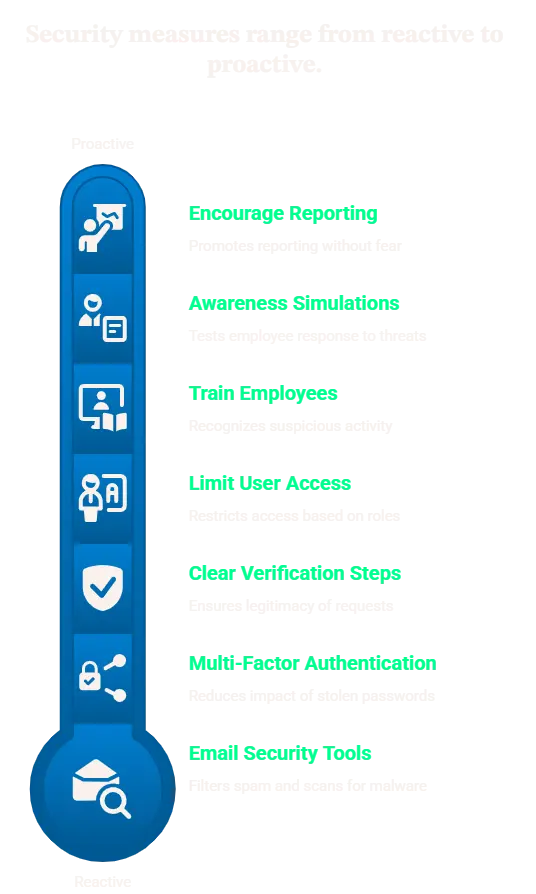
Organizations Prevent Social Engineering Attacks

Organizations can prevent them by combining employee awareness, verification processes, technical controls, and regular security testing.

Key prevention steps include:

  • Train employees to recognize suspicious emails, calls, links, attachments, and payment requests.
  • Use multi-factor authentication to reduce the impact of stolen passwords.
  • Create clear verification steps for payments, vendor changes, and sensitive data requests.
  • Use email security tools, spam filters, domain protection, and malware scanning.
  • Limit user access based on role and business need.
  • Conduct awareness simulations in a safe and authorized manner.
  • Encourage employees to report suspicious activity without fear.

What Should Employees Do When They Suspect an Attack?

Employees should stop, verify, and report.

  • Do not click unknown links.
  • Do not download unexpected files.
  • Do not share OTPs, passwords, or personal data.
  • Confirm urgent requests through official channels.
  • Report the message to IT or security teams.

Conclusion

Social Engineering Attacks are dangerous because they target human decision-making, not just technology. They use trust, urgency, fear, and deception to make people click links, share data, approve payments, or reveal credentials.

The best protection is a combination of awareness training, strong verification processes, multi-factor authentication, email protection, access control, and regular testing. When organizations understand how these attacks work, they can reduce human-risk exposure and respond more confidently to suspicious activity.

To take your learning to the next level, explore our diverse selection of courses designed to help you grow professionally. Visit our Courses page to find the perfect course for your needs.

Start your journey today with Securetain, where we support your path to success.

FAQs

No, attacks can happen through emails, phone calls, SMS, WhatsApp messages, social media, fake websites, QR codes, and even in-person conversations.

They are hard to detect because attackers make messages look trusted, urgent, and realistic. Many attacks copy real workplace situations, brands, executives, or vendor communication styles.

Attackers usually target passwords, OTPs, banking details, employee credentials, customer data, confidential files, payment approvals, and access to internal systems.

Multi-factor authentication reduces the risk of stolen passwords being misused, but it cannot stop every attack. Employees still need to verify links, requests, calls, and approval messages carefully.

They should stop using the page, avoid entering any details, disconnect if needed, report it to the IT or security team, change passwords, and monitor accounts for unusual activity.

Strengthen human-risk awareness

Explore cybersecurity and awareness courses that help teams recognize manipulation, verify requests, and respond confidently to suspicious activity.

Related reads

Keep exploring

View all posts